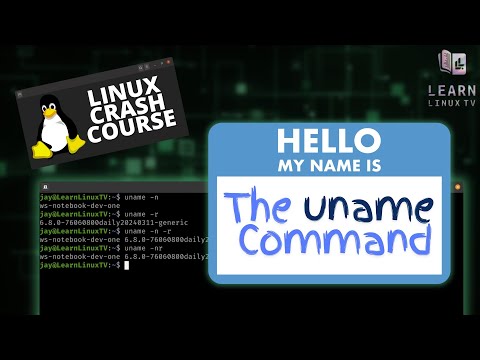
In the Linux Crash Course series, Jay walks you through a very important Linux-related command or topic that will help you along your career. This series includes in-depth tutorials that you can watch in any order, and with over 70 episodes in the series (and counting) it’s an amazing resource! In this video, Jay covers the uname command.
*LEARN LINUX TV – YOUR HOME FOR LINUX-RELATED FUN AND LEARNING!*
*🎓 BRAND NEW UDEMY COURSES AVAILABLE!*
Check out my new courses on Udemy and learn something new!
• Getting Started with Ansible ➜ https://learnlinux.link/ansible
• LPI Linux Essentials Complete Workshop ➜ https://learnlinux.link/linux-essentials
*🐧 SUPPORT LINUX LEARNING!*
• Grab some Linux swag ➜ https://merch.learnlinux.tv
• Become a Channel Member ➜ https://learnlinux.link/member
• Become a Patron ➜ https://learnlinux.link/patron
• 5% discount on LPI exam vouchers ➜ https://learnlinux.link/lpi-voucher
• Check out my latest book ➜ https://ubuntuserverbook.com
• Grab an awesome Pi-powered KVM ➜ https://learnlinux.link/tinypilot
• Jay’s Gear – Server, Computer and Video Production Stuff ➜ https://learnlinux.link/amazon
_Note: Royalties and/or commission is earned from each of the above links_
*🎓 FULL LINUX COURSES FROM LEARN LINUX TV*
• Linux Crash Course ➜ https://linux.video/cc
• Learn tmux ➜ https://linux.video/tmux
• Learn vim ➜ https://linux.video/vim
• Bash Scripting Series ➜ https://linux.video/bash
• Proxmox VE ➜ https://linux.video/pve
• Getting Started with Ansible (Udemy) ➜ https://learnlinux.link/ansible
• LPI Linux Essentials Workshop (Udemy) ➜ https://learnlinux.link/linux-essentials
*🕐 Time Codes*
00:00 – Intro
01:03 – The Merch shop was recently updated! Check it out!
01:46 – Printing platform information with the uname command
02:50 – Printing your kernel version with the uname command
04:01 – Returning your node name with the uname command
05:09 – Ansible course mention
06:10 – Returning architecture information with uname
06:48 – Combining options with the uname command
07:37 – Pring all information with uname
*📘 FAQ*
• What is a "Distribution" of Linux? ➜ https://linux.video/what-is-a-distro
• What is a "Desktop Environment"? ➜ https://linux.video/desktop-environment
• Which Server Distro should I use? ➜ https://linux.video/which-server-distro
• How do I create USB install media? ➜ https://linux.video/install-media
• How do I create multi-boot USB media? ➜ https://linux.video/ventoy
• How do I connect to a server via SSH? ➜ https://linux.video/use-ssh
• How do I exit vim? ➜ https://linux.video/vim
• How do I use APT? ➜ https://linux.video/apt
• How do I use DNF? ➜ https://linux.video/dnf
• How do I use pacman? ➜ https://linux.video/pacman
• How do I use zypper? ➜ https://linux.video/zypper
• What is a "Flatpak"? ➜ https://linux.video/flatpak
• What is a "Snap" package? ➜ https://linux.video/snap
• How do I install Arch Linux? ➜ https://linux.video/install-arch
• How do I configure SSH on my server? https://linux.video/ssh-server
• How do I install updates? ➜ https://linux.video/updates
• How do I secure my Linux Server? ➜ https://linux.video/every-server
• How do I use LVM? ➜ https://linux.video/lvm
• How do I use Git? ➜ http://linux.video/git
• When will the "Year of the Linux Desktop" Happen? ➜ https://linux.video/yotld
• Do you have a sense of humor? ➜ https://linux.video/lol
*🌐 LEARN LINUX TV ON THE WEB*
• Main site ➜ https://www.learnlinux.tv
• Community ➜ https://community.learnlinux.tv
• Official Github Account ➜ https://github.com/LearnLinuxTV
• Enterprise Linux Security Podcast ➜ https://enterpriselinuxsecurity.show
• The Homelab Show Podcast ➜ https://thehomelab.show
• Jay on Udemy ➜ https://www.udemy.com/user/jay-lacroix-3
• Jay on Twitter ➜ https://x.com/JayTheLinuxGuy
• Content Ethics ➜ https://www.learnlinux.tv/content-ethics
• Request Assistance ➜ https://www.learnlinux.tv/request-assistance
*⚠️ DISCLAIMER*
Learn Linux TV provides technical content that will hopefully be helpful to you and teach you something new. However, this content is provided without any warranty (expressed or implied). Learn Linux TV is not responsible for any damages that may arise from any use of this content. Always make sure you have written permission before working with any infrastructure and that you are compliant with all company rules, change control procedures, and local laws.
#CloudComputing #DevOps #Linux